
Better English
in any Mac app.
One shortcut.
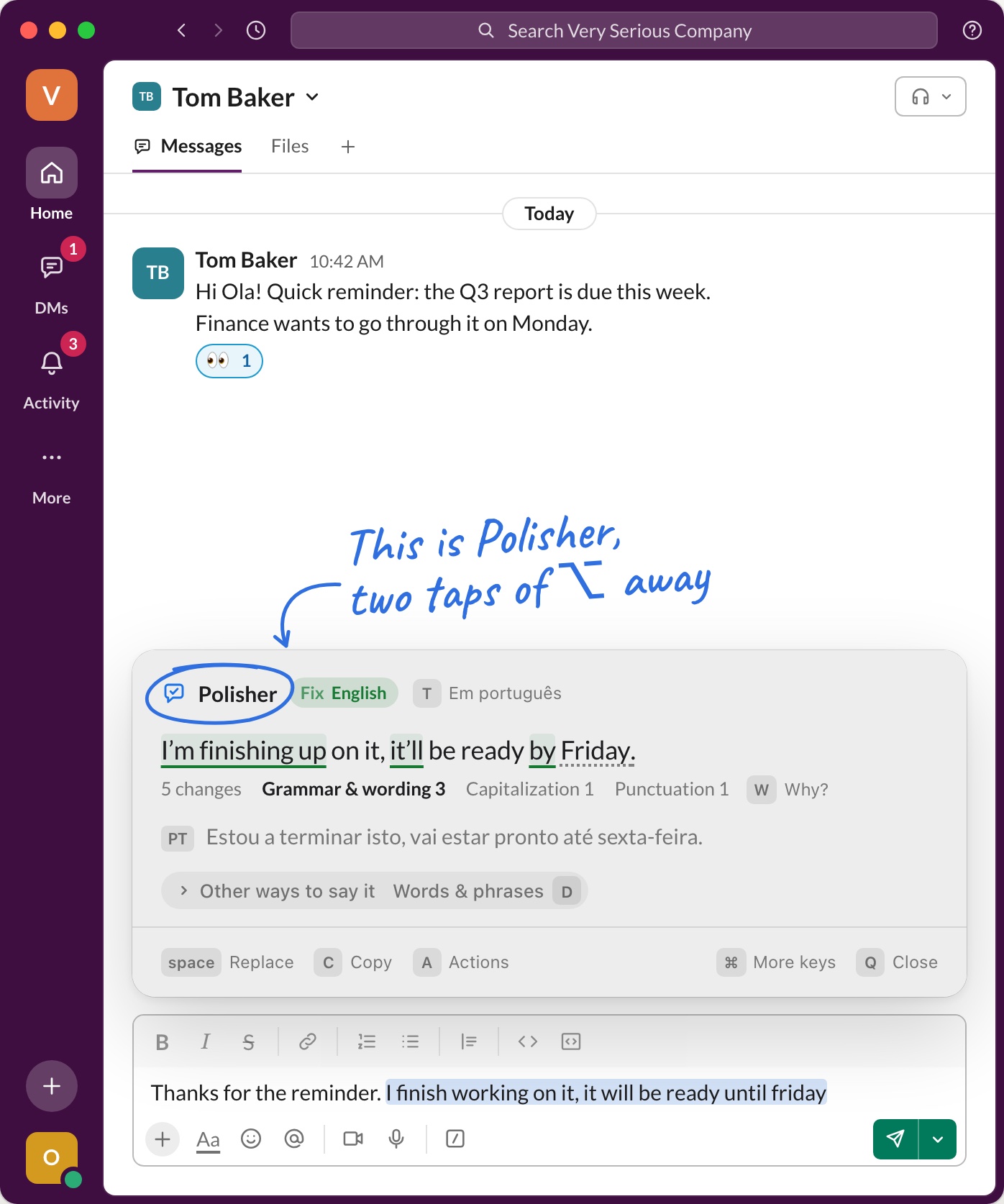
Write as usual and tap Option twice: your text comes back in natural English, right where you wrote it.
Free. Running locally.
Hi Ola! Quick reminder: the Q3 report is due this week.
Finance wants to go through it on Monday.
I’m finishing up on it, it’ll be ready by Friday.
5 changesGrammar & wording 3Capitalization 1Punctuation 1
PTEstou a terminar isto, vai estar pronto até sexta-feira.
Thanks for the reminder. I finish working on it, it will be ready until friday
Sound familiar?
- You reread every message before you dare to send it.
- You paste into a chatbot, then fix the links it broke.
- Your client up on someone else’s server.
- You pay every month for a few fixes a day.
Polisher fixes all four, right where you write. Just tap Option twice.
Before and after
Same message. Better English.
- Write as usual
- Tap Option twice
- Press space to keep it
No need to select anything: Polisher takes the whole text field. Only part of it? Select that first. Rather use a shortcut? Shift-Command-E does the same.
Slack message
to a teammateBefore
@anna sorry for late answer, i was checking logs and problem is in the cache. i will make fix today and let you know
After Option twice
@anna Sorry for the late reply. I checked the logs and the problem is in the cache. I’ll fix it today and let you know.
Kept the @mention and the friendly tone.
Every example keeps its @mentions, links and code, so there’s nothing to afterwards.
And one more thing
It translates, too.
Set the language you write in and your own, and the same card goes both ways.
- PL → EN
Write in your own language.
Tap Option twice and it comes back as natural English, right where you wrote it.
- EN → PL
Read in your own language.
Select a web page, or an email someone sent you, and Polisher puts it into your language.
- Fix · Translation
Check what you wrote.
Every fix comes with a line in your language, and T in the card switches between the two.
On your mouse
One of those apps you want under a mouse button.
Pick a spare button in Polisher’s settings: the middle one, back or forward. Press it in your text, then click Replace. Your hand never leaves the mouse.
A Logitech mouse keeps its buttons to its own app: there, give one the keyboard shortcut Shift-Command-E in Logi Options+.
Stop pasting “Fix my grammar” into ChatGPT.
If you that copy and paste is a chore, here is the shorter way.
The usual way 6 steps
- Select and copy your text
- Open ChatGPT
- Type “Fix my grammar”
- Paste it and wait
- Copy the answer
- Go back and paste it in
Polisher 3 steps
- Write your text
- Tap Option twice
- Press space
Fixed right where you wrote it, in any app.
Free. Running locally.
Private and free
Your text stays on your Mac.
Runs on your Mac
The model works right here, with no server in between. Your text never leaves your Mac.
Works offline
On a plane, on a train, or on hotel Wi‑Fi that hasn’t worked .
Free, no account
Download it and start. No sign-up, no credit card, no subscription.
Heavy on memory
About 2.6 GB while the model is loaded, up to 4.5 GB on long texts. Polisher frees it after 15 idle minutes.
Short on memory? Switch to Apple Intelligence if your Mac has it: no extra memory, fewer languages. Or use a cloud model: add an API key (Anthropic, OpenAI, OpenRouter, Gemini) or use Claude Code or Codex; then your text goes to that provider.
Questions
Will it change my meaning or tone?
No. It keeps your meaning, tone and formality, and shows every change before you accept it.
Nothing is replaced until you press space, so you can’t without noticing.
Do I have to select the text?
No. Tap Option twice anywhere in a text field and Polisher takes all of it, up to 4,000 characters.
To fix only part of it, select that part first. In Chrome, always select the text yourself: Chrome doesn’t tell other apps where the cursor is.
Can I use a shortcut instead?
Yes. Shift-Command-E does the same as Option twice, and you can record your own in Settings.
There you can also pick ⌘, ⌃ or ⇧ to tap twice instead of Option, or give Polisher a button on your mouse.
Is my text private?
Yes. The model runs on your Mac and works offline, so your text never leaves it.
Only if you choose a cloud provider instead (an API key, Claude Code or Codex) does your text go to that provider.
How much memory does it use?
A lot, to be honest. The default model holds about 2.6 GB while it’s loaded and peaks at about 4.5 GB on very long texts. The larger models take up to 9.4 GB. On a Mac with 8 GB, that’s a big share.
Polisher frees the memory after 15 idle minutes. The next time you use it, the model loads again in a few seconds.
Still too much? Switch to Apple Intelligence, if your Mac has it, or to a cloud model: add an API key (Anthropic, OpenAI, OpenRouter, Gemini) or use Claude Code or Codex. With a cloud model, your text goes to that provider.
Which languages does it handle?
English by default; German, Polish and others work too.
Write in English and get it fixed, with a translation into your own language. Write in your own language and get natural English back.
What’s the catch?
There isn’t one. We build software we use ourselves every day, and Polisher is one of those tools, so we’re sharing it.
We also make apps we sell, like Send, an email client for Mac. They’re what keep this one free.